
Why is my Lenovo laptop not charging? Lenovo laptops sometimes refuse to charge due to power issues, hardware faults, or software glitches. This guide explains common causes and practical fixes you can try at this time.
In short, a Lenovo laptop may not charge because of a faulty AC adapter, damaged charging port, depleted battery, or a software power management error. Most issues resolve with a hard reset, a different charger, or a BIOS update. Check the adapter LED and battery status in Lenovo Vantage first.
Key Takeaways
- A Lenovo laptop that shows no charge light often has a failed AC adapter or broken DC port.
- Performing a battery reset through the Novo button or BIOS fixes many “plugged in not charging” errors.
- According to the U.S. Department of Energy, lithium-ion batteries lose notable capacity after 300 to 500 charge cycles.
- Using a non-Lenovo USB-C charger with Power Delivery can work but must meet the wattage rating of your model.
- Windows ACPI driver conflicts cause false battery readings, and a driver reinstall often restores charging.
What Is a Lenovo Laptop Charging Problem?
A charging problem means your laptop cannot draw power from the wall or cannot fill the battery. The screen may show a plugged icon with no percentage gain. Sometimes the device runs only on AC power and shuts off when unplugged.
Lenovo builds laptops with lithium-ion batteries and smart charging circuits. The ACPI standard controls power states in Windows. A fault in any part stops charging.
Important: A charging issue is not always a dead battery. Many cases trace to the adapter or motherboard port.
Common signs include a red cross on the battery icon, a blinking orange LED, or the laptop only booting when the charger is present. These symptoms point to different layers of the power path. You should map the symptom to the cause before buying parts.
- No LED on the adapter brick means the power source or cable failed.
- Intermittent charging at a specific angle reveals a loose physical port.
- A stuck percentage suggests a software or firmware communication break.
- Rapid shutdown under load signals a battery that cannot hold cells in balance.
How Does Lenovo Laptop Charging Work?
The AC adapter converts wall power to low-voltage DC. It sends power through the charging port to the battery controller. The controller talks to the BIOS firmware and Windows via ACPI.
Modern Lenovo models use USB-C Power Delivery or rectangular slim tip connectors. The charger identifies itself to the laptop through a signal pin. If the laptop rejects the ID, it refuses to charge.
- The adapter steps down 120V or 230V AC to 20V DC for most models.
- The battery management system limits current to protect cells from overheating.
- Lenovo Vantage software monitors cycle count and health percentage.
- The USB-C port negotiates wattage up to 65W or 100W depending on model.
- Energy Star compliant idle states reduce draw but need correct driver support.
According to the U.S. Department of Energy, lithium-ion batteries typically retain 80% capacity after 300 to 500 cycles. This means older laptops may charge slowly or stall. The chemical age matters more than the calendar date.
Tip: Open Lenovo Vantage and check battery health before buying a new charger.
What Are the Common Reasons a Lenovo Laptop Won’t Charge?
When users search why is my Lenovo laptop not charging? they usually suspect the battery first. In reality, the fault spreads across several components. We list the top causes below with quick fixes. Use the table to match your symptom.
| Symptom | Likely Cause | First Fix |
|---|---|---|
| No LED on adapter | Dead AC adapter or wall outlet | Test another outlet, replace charger |
| Plugged in, not charging | Driver or ACPI conflict | Reinstall Microsoft ACPI driver |
| Charges only at angle | Loose DC port solder | Repair port at service center |
| Battery at 0% forever | Deep discharged or failed cell | Perform battery reset, then replace |
According to Wikipedia, lithium-ion cells self-discharge at 1.5% to 2% per month, which can confuse users who store laptops. A deeply discharged battery may need a long trickle charge to wake.
Adapter and Cable Faults
- Faulty AC adapter: The brick overheats or the cable frays near the tip.
- Wrong wattage: A 45W charger on a 65W laptop maintains but will not fill the battery.
- Third-party cable: Poorly made USB-C cables drop voltage under load.
Port and Motherboard Issues
- Damaged charging port: Physical strain breaks the center pin or USB-C latch.
- Spilled liquid: Corrosion on the port pads blocks the identify signal.
- Charger IC failure: The motherboard power stage dies after power surges.
Software and Firmware Causes
- Outdated BIOS: Old firmware misreads the charger ID and blocks power.
- Windows power driver bug: The ACPI battery driver reports false status.
- Conservation mode: Lenovo Vantage limits charge to extend lifespan.
Warning: Never open the battery pack. Lithium-ion cells can catch fire if punctured.
How to Verify Charger Wattage
- Read the output label on the adapter brick for volts and amps.
- Multiply volts by amps to get watts, then compare to laptop specs.
- If the watts are lower than required, charging will stall or pause.
Who Needs to Troubleshoot a Lenovo Charging Issue?
Any owner of a Lenovo ThinkPad, IdeaPad, Legion, or Yoga may face this fault. Students, remote workers, and gamers rely on steady power. If your device is under warranty, contact Lenovo Support before opening it.
- Remote employees who cannot risk downtime during video calls.
- Students with tight budgets who need a free software fix first.
- Travelers using foreign outlets and third-party adapters.
- IT admins managing fleets of ThinkPad laptops in offices.
- Creators rendering video who draw full wattage from the battery.
According to the U.S. Consumer Product Safety Commission, defective laptop batteries have prompted recalls covering over 100,000 units in various incidents. Check your model number against recall lists before DIY repairs.
How to Fix a Lenovo Laptop That Won’t Charge
Follow these steps in order. Most users regain charging within 20 minutes. If you still ask why is my Lenovo laptop not charging? after these, the hardware likely failed.
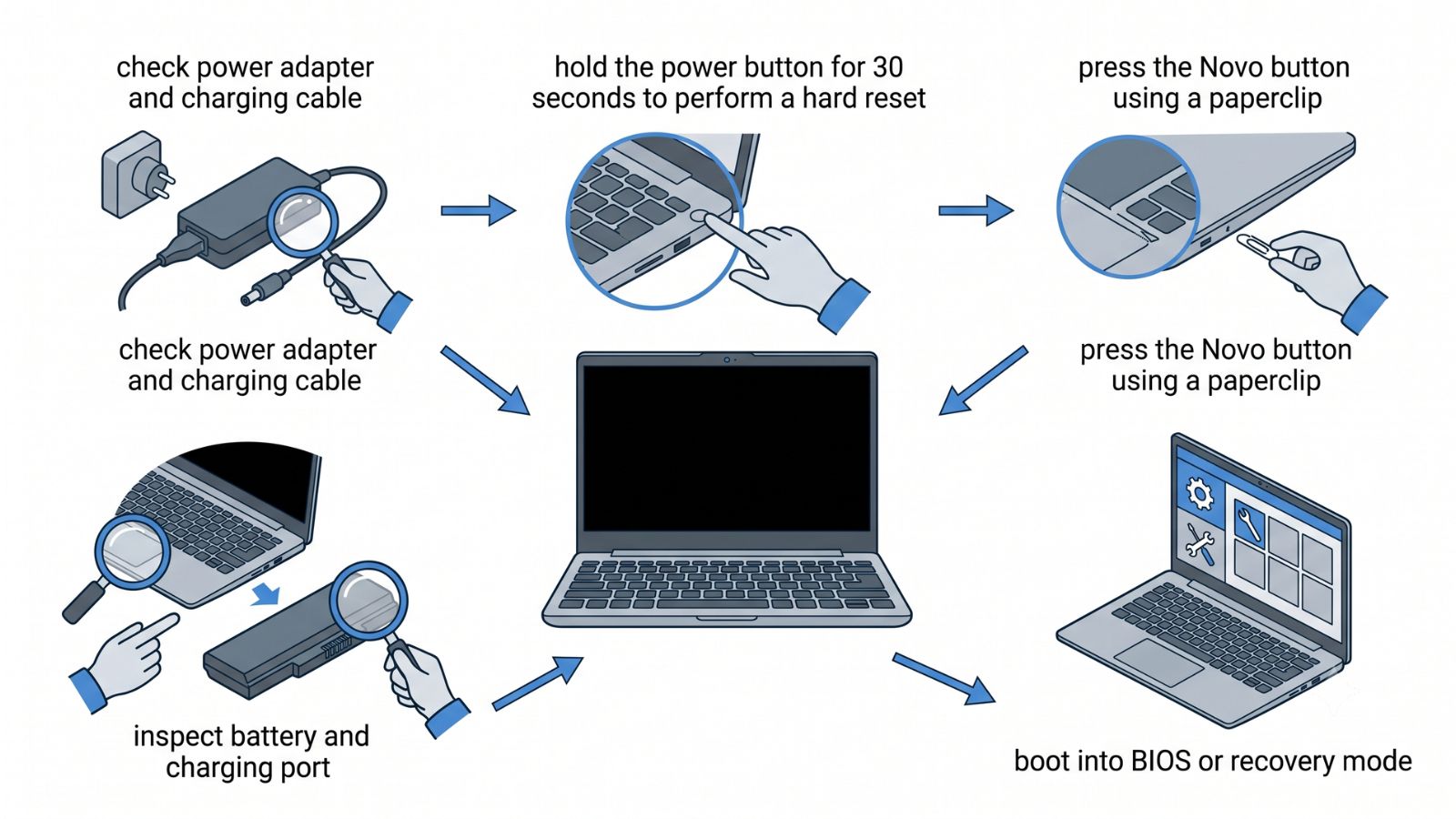
- Unplug the adapter and hold the power button for 30 seconds to drain flea power.
- Connect the charger to a known-good wall outlet and check the adapter LED.
- Open Lenovo Vantage and run the battery reset function from the hardware scan.
- Boot into BIOS by pressing F2, load default settings, and confirm charger wattage.
- In Windows Device Manager, uninstall the Microsoft ACPI Compliant Control Method Battery driver and reboot.
- Test with a spare Lenovo charger or a USB-C Power Delivery brick of equal watts.
- If nothing works, schedule repair for the DC port or battery at an authorized center.
Important: Always power off and disconnect before inspecting the charging port.
These steps address software and minor hardware issues. The Department of Energy notes that keeping batteries between 20% and 80% extends life and prevents deep discharge stalls. Build this habit after the fix.
Why Your Lenovo Laptop Shows “Plugged In, Not Charging”
This specific message means Windows sees the adapter but blocks the battery. The cause is often a threshold set in Lenovo Vantage or a corrupted driver. Some models use a conservation mode that stops at 60%.
- Conservation mode: Enabled in Vantage to reduce wear, limits charge to 55-60%.
- Calibration needed: The fuel gauge drifts and needs a full cycle to recalibrate.
- Charger wattage too low: A 45W brick on a 65W laptop may maintain but not charge.
- BIOS battery flap: A bug requires a firmware update from Lenovo.
How to Disable Conservation Mode
- Open Lenovo Vantage from the Start menu.
- Click the Hardware Settings tile then Power.
- Toggle off Conservation Mode and set charge threshold to 100%.
- Restart the laptop and plug in the charger.
Disable conservation mode first. Then run a full discharge and recharge. If the message remains, reinstall the ACPI driver as listed in the steps above.
Tip: Press Fn+R or use Novo button to launch hardware diagnostics without Windows.
Common Myths vs Facts
Many users believe wrong fixes. We clear three common myths about Lenovo charging problems.
- Myth: You must replace the battery if the laptop shows no charge. Fact: A $20 adapter or free driver reset often solves the issue.
- Myth: Only Lenovo brand chargers work safely. Fact: Certified USB-C Power Delivery chargers with correct wattage charge Lenovo laptops fine.
- Myth: Calibrating the battery fixes all “not charging” errors. Fact: Hardware port damage needs physical repair, not software calibration.
Frequently Asked Questions
Why is my Lenovo laptop not charging even with a new adapter?
If a new adapter fails, the DC port or battery controller is likely damaged. According to Lenovo support, a motherboard power circuit fault requires service center repair. Test the port with a flashlight for bent pins.
How do I reset the battery on a Lenovo ThinkPad?
Shut down, press the Novo button, and select Battery Reset. Alternatively, hold the power button for 30 seconds with the charger unplugged. This drains residual charge and recalibrates the controller.
Can a USB-C phone charger power my Lenovo laptop?
A phone charger with Power Delivery at 30W or higher may run the laptop but charge slowly. Lenovo recommends 65W for most mainstream models. Check the wattage label on your original brick.
What does a blinking orange battery light mean?
A blinking orange LED signals a battery error or deep discharge. The lithium-ion battery may need a long static charge. Leave it plugged in for two hours before powering on.
Should I update BIOS to fix charging?
Yes, Lenovo publishes BIOS updates that correct charger identification bugs. According to IDC, laptop firmware updates resolve a measurable share of power complaints. Download from the support page for your exact model.
Final Thoughts
Most Lenovo charging failures come from adapters, ports, or driver conflicts rather than dead batteries. Use the reset steps and Vantage tools before spending money. Keep your firmware current to avoid repeated issues.